Table ordering & QR menu

Your QR menu, for viewing or ordering from the table

Each table has its own QR. Your customers open your menu in their language and, if you want, order from the table without waiting to be served. It's the same online store, with the menu you choose for the dining room.

+20%

table turnover with table ordering and kiosk

+300

restaurants

Customer scans the table QR code with her phone on a restaurant terrace to open the menu and order
You choose

Just to show your menu, or so guests can order from the table

Start however you like and switch whenever you like, without setting up anything new.

QR menu

Your customers scan the QR code and see your menu with photos, allergens and in their language. No reprinting menus every time you change a price.

Change a dish and it updates instantly

Mark a dish as sold out in one click

Ideal if you don't want to take orders yet
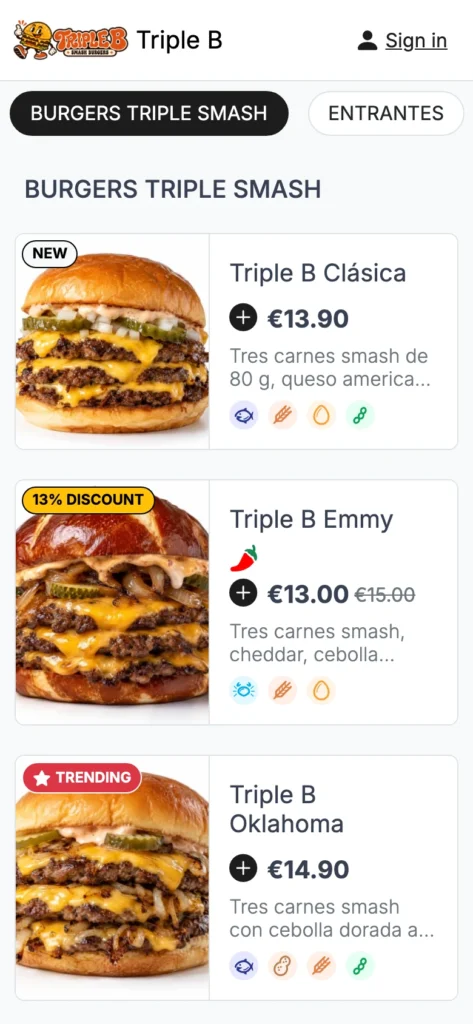
Table ordering

As well as viewing the menu, they order from their phone and the order arrives with their table number, without waiting for the waiter.

They can order several rounds at the same table

They pay when ordering or at the end, as you decide

With the menu you choose for the dining room

How your customer orders

From sitting down to ordering, no waiting

No app and no calling anyone: all from their phone.

Table QR menu open on the phone after scanning the QR code, with photos, prices and allergens
1

Scan the QR code on their table

With the phone camera. The menu opens instantly and already knows which table they're at.

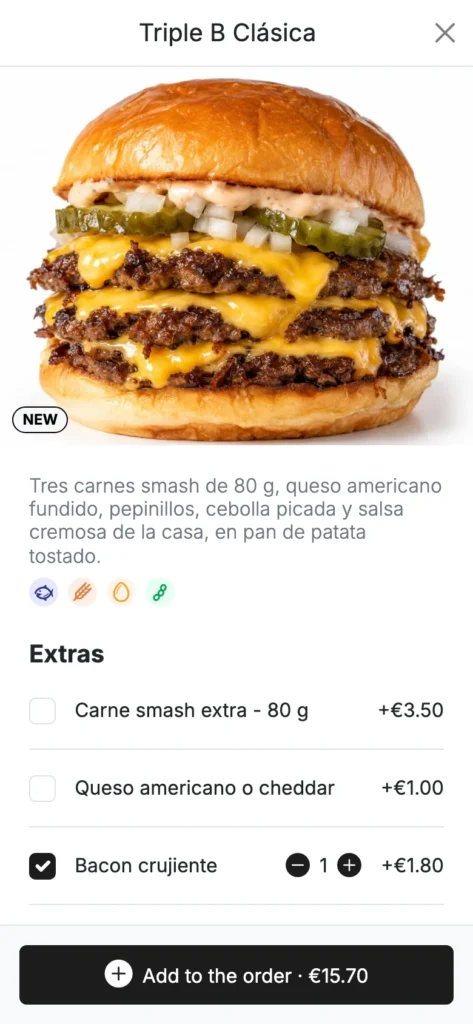
Burger page on the QR menu with extras to customise the order
2

Choose and customize

They see photos and allergens and add extras or options to each dish. If they prefer, they switch the menu to their language.

Order from the table with the option to pay the waiter after the meal, in cash or by card
3

Order, and order again

The order arrives with the table number and the customer pays when ordering or at the end, depending on your venue. Another round or dessert? From the same phone.

Nothing to download and no waiting for the waiter: ordering another round is that easy. Real Delitbee screens on the Triple B demo menu. Try it yourself →

What your restaurant gains

More rounds, less waiting and your team where it's needed

Restaurants with table ordering and kiosks get 20% more table turnover.

More rounds

Ordering another drink or dessert is as easy as tapping a button. No one is left waiting for the waiter to come by.

Your team, serving

Less time taking orders and more time serving, recommending and looking after the dining room.

Error-free orders

The order arrives in writing, with its extras and the table, straight to your dashboard and your POS.

Menu always up to date

Change a price or mark a dish as sold out and every table sees it instantly. No reprinting.

Well-served tourists

Each customer sees the menu in their language and orders without misunderstandings.

Returning customers

Your loyalty club also works at the table: your customers earn rewards just like in the online store.

A single store

The same store at the table, for takeaway, for delivery and at the kiosk

They're not separate products: it's your online store at another point of sale. You manage everything from one dashboard and decide which menu is shown on each channel.

Integrations

Table orders go to your POS

You don't change your till or the way you work. And if your waiters take orders, they do it with the waiter app, which is this same store in dine-in mode.

Ask us

the cost of table orders depends on your venue

Up to 15 table QR codes on Pro, unlimited on Advance

No long-term commitment and no setup fee

We set up your menu with you and train your team

See plans and pricing →
Frequently asked questions

What we're often asked about the QR menu

Do your customers have to download an app?

No. They scan their table's QR code with their phone camera and the menu opens instantly, without downloading or installing anything. It's been designed for mobile from day one.

How do I know which table each order is from?

Each table has its own QR, so the order arrives with the table number without the customer having to enter it.

How do your customers pay at the table?

You decide: they can pay from their phone when they order, by card, Apple Pay or Google Pay, or pay at the end in the restaurant, as usual.

Can I have just the menu, without ordering?

Yes. You can use it just as a QR menu, so your customers can see the menu without being able to order, and turn on table ordering whenever you want.

What languages is the menu in?

The menu is multilingual: your customer sees it in their language and you manage it from a single dashboard.

How many tables can I have?

Up to 15 table QR codes on the Pro plan and unlimited on the Advance plan.

Free assessment

Is a QR menu right for your dining room?

We look at your dining room with you and help you decide whether to start with the menu only or also with ordering and payment from the table.

Whether you need just the digital menu or table ordering too

How many QR codes you need and how to split them between dining room and terrace

How orders reach your POS, your kitchen and your waiters

Free

Pau, equipo comercial de Delitbee Dani, equipo comercial de Delitbee Her, equipo comercial de Delitbee Jesús, equipo comercial de Delitbee Genesis, equipo comercial de Delitbee

Pau, Dani, Her, Jesús and Genesis

Delitbee sales team

What you get

An estimate of what you can save with your own channel and the first steps to get there

How long it takes

10-15 minutes

Cost

Free and no strings attached